Bootable usb pendrive using cmd

Creating a usb pendrive using command prompt is not hard, it is one of the most common ways to create a bootable usb.
      This method does not work if your operating sistem is windows xp or windows 8 , you cannot select the primary partition in comand prompt.
       You just need to follow these simple steps:
  1. First step is to obtain the windows files from somewhere and save them to a folder in your pc. You can rip a windows dvd , or if you have the iso image file you can open it with magic disc or daemon tools or even winrar , and you need to copy the whole content to a folderanywhere in your pc , you just need to make sure you know where it is located.
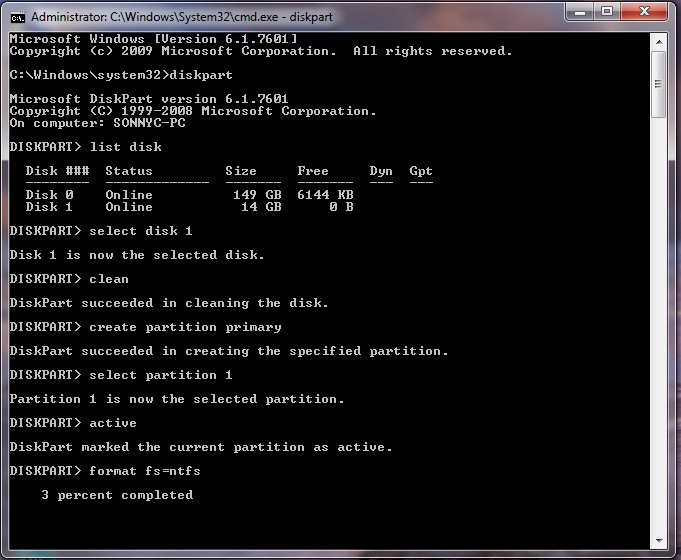
  2. Make sure your usb stick is inserted, go to start search cmd , right click the  file and selectrun as administrator. The command prompt will appear, now you need to write the following comands:
  3. diskpart→list disk→select disk 1(chose  the usb device, you will recognize it by its size)→clean(this will erase the usb)→create partition primary→select partition 1→active→format fs=ntfs(this will format the usb drive and will take 10-15 minutes)→Untitled 5
  4. After the format is done you have to continue writting  in command promt :  →assign(now you will notice that the usb drive changed its letter to (H): or (G))→exit(this command will exit the disk part function)
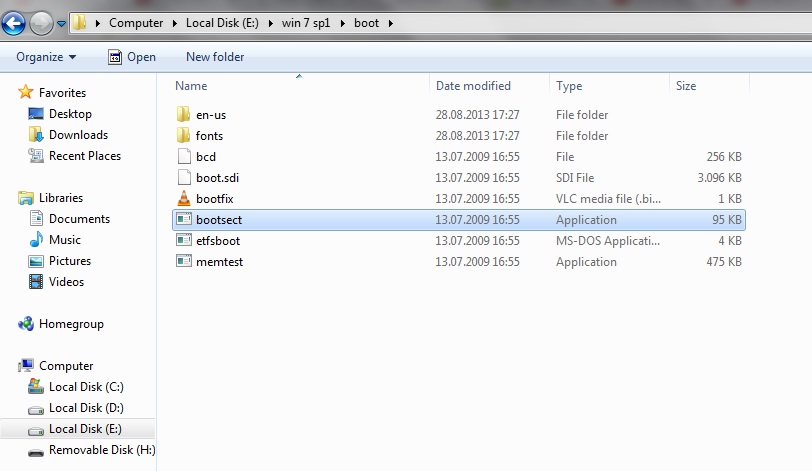
  5. Now you have to write the path to the executable file in your windows saved folder , make sure that in your windows folder you have the boot folder with the bootsect executable file.Untitled 8
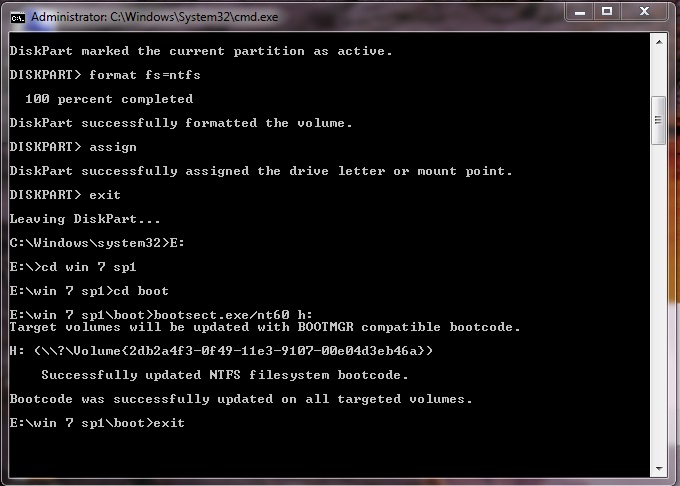
  6. In my case the command goes like this:   E:→cd win 7 sp1→
           →cd boot→bootsect.exe/nt60 h:(h is the letter of the usb drive ,this comand will update the boot core)→exit (this will exit command prompt).
Untitled 6
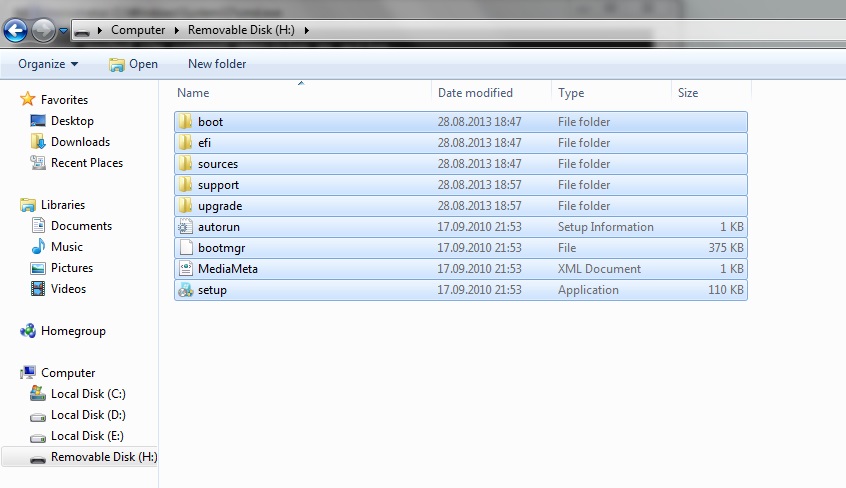
  1. Now you have to copy all the files in the windows folder to your usb drive. Untitled 7
  2. ALL DONE. You can now restart your pc and boot from the usb hard drive.
Comments

Popular posts from this blog

Reasons not to buy Akaso action camera if you are from india

Recently I made a full review of the action camera I brought after doing a ton of research and time. Having used it for a couple of months I feel extremely glad that it meets up to my expectations. But recently, I accidentally tipped off the camera without an external case and it cracked my lens. This, in turn, added a shady spot on my phone or video and I cannot use that anymore (Some phones of the cracked lens below)     I immediately mailed the akaso team to ask if there is anything they could do but unfortunately, this was their response. Oops, that was not what I was expecting and then I asked them I could get any details of the replacement parts or anything like that so that I can order it online. But that didn't happen it took a lot of time for them to respond me back(I have been bugging them on Facebook and email).  But after some time they left me with this response which I had no other choice but to accept. After getting the 50%re...

Facebook Whitehat

Have you ever wondered that Facebook provides you some test accounts in case if you are trying to find some bugs are attempting to attacks on some personal accounts. So its quiet interesting, lets take a look at them now just login to your Facebook account.. and then go to this link.. Facebook whitehat Then you may find out 4 sections in the page 1-Info            This basically provides you all the security related issues for Facebook and even provides you the opportunity to report the posts that are against the terms and conditions and violating the security issues.. Here are some links that might be important.. In case of any hacked accounts :  Hacking reports Abuse reports :  Report abuse 2-Thanks                The names are those who reported Facebook some bugs and helped Facebook for making their security issues more strong 3-Report a Security vulnerability     ...

Extjs - basics on file-system

Hope you created your first project with command prompt and knew some basics of where the application starts loading files and makes up the complete interface and functionalities. if not I recommend you to start from the initial step and come back here. So when you start your project on a desktop it will check for the main file in the classic folder and shows it to the user.   classic > src > view > main > Main.js Now let's start with this Main.js file and understand better about the project. This main file basically has some extended components  Ext.tab.Panel which extends the main page view to have a tab panel view in it. requires has all the other components that are being used in this page as components. Header of the side tab has all the properties such as layout that defines what should be the layout for the header which is aligned to stretchmax, and the title which is being binded which a data feild named name where the name is from ...